Anti-theft security
I found a good solution for laptops called PreyProject.
Hard Drive Security
I have found a good solution for Hard Drives called BitLocker.
2011-04-08


2011-04-04
About Python
On Windows
Always read the open source project site.
Use the following environment variables:
PYTHONHASHSEED=random
PYTHONHOME=C:\Python27
PYTHONIOENCODING=utf-8
PYTHONPATH=C:\Python27\Lib;C:\Python27\DLLs;C:\Python27\Lib\lib-tk
PYTHONWARNINGS=default
PYTHONY2K=True
Always read the open source project site.
Use the following environment variables:
PYTHONHASHSEED=random
PYTHONHOME=C:\Python27
PYTHONIOENCODING=utf-8
PYTHONPATH=C:\Python27\Lib;C:\Python27\DLLs;C:\Python27\Lib\lib-tk
PYTHONWARNINGS=default
PYTHONY2K=True
2011-03-27
About perl
On Windows
Is preferred to use the open source project Strawberry.
Download and run the installer.
You can refer to their wiki.
Set the environment variables first:
-EDITOR=%windir%\system32\notepad.exe
-HOME
-LANG=en_US.UTF8
-TERM
-VISUAL (i.e. D:\GNU\Notepad++\notepad++.exe)
-PERL5SHELL=%windir%\system32\cmd.exe
-PERL5LIB=C:\strawberry\perl\lib\
On other than Windows
Set the environment variables first:
-EDITOR=/usr/bin/nano
-HOME
-LANG=en_US.UTF8
-TERM
-VISUAL
-PERL5SHELL
-PERL5LIB=/usr/lib/perl5/
Use CPAN
Update CPAN in CPAN:
cpan> install CPAN
cpan> install Bundle::CPAN
cpan> q
Install PPM using CPAN:
cpan> d /ppm/
Choose and go.
Add you corresponding repositories on PPM as:
set repository MSWin32x86 http://ppm4.activestate.com/MSWin32-x86/5.12/1200/
set repository UWinniePack12xx http://cpan.uwinnipeg.ca/PPMPackages/12xx/
set repository TrouchellePPM12 http://trouchelle.com/ppm12/
set repository WxPerl http://www.wxperl.co.uk/repository/
set repository Bribes http://www.bribes.org/perl/ppm/
set repository BioPerlDist http://bioperl.org/DIST
set repository BioPerlRC http://bioperl.org/DIST/RC
set repository tcool http://ppm.tcool.org/archives/
set repository GtkPerl http://gtk2-perl.sourceforge.net/win32/ppm/
Add your CPAN modules as:
install Captcha::reCAPTCHA
install Class::Accessor
install Class::Autouse
install Class::Data::Inheritable
install Class::Trigger
install Compress::Zlib
install Convert::Binary::C
install Crypt::DH
install DBD::mysql
install DBI
install DB_File
install Data::Stag
install Data::Stag::XMLWriter
install DateTime
install Digest::HMAC_SHA1
install Digest::MD5
install Digest::SHA1
install File::Temp
install GD
install GD::Graph
install GTop
install GnuPG::Interface
install Graph
install Graph::Directed
install HTML::Entities
install HTML::Parser
install HTML::Tagset
install HTML::Template
install HTTP::Request::Common
install IO::String
install IO::WrapTie
install IP::Country::Fast
install Image::Magick
install Image::Size
install LWP::Simple
install LWP::UserAgent
install List::MoreUtils
install MIME::Lite
install MIME::Words
install Mail::Address
install Mail::GnuPG
install Math::BigInt::GMP
install Net::DNS
install Proc::ProcessTable
install RPC::XML
install SOAP::Lite
install SVG
install Set::Scalar
install Spreadsheet::ParseExcel
install Statistics::Frequency
install Storable
install String::CRC32
install Text::Shellwords
install Text::Wrap
install Text::vCard
install URI::Fetch
install URI::URL
install Unicode::CheckUTF8
install Unicode::MapUTF8
install XML::Atom
install XML::DOM
install XML::DOM::XPath
install XML::LibXML
install XML::Parser
install XML::Parser::PerlSAX
install XML::RSS
install XML::SAX
install XML::SAX::Base
install XML::SAX::Writer
install XML::Simple
install XML::Twig
install XML::Writer
BioPerl
Follow their wiki.
Install dependencies as:
install Ace
install Bio::ASN1::EntrezGene
Is preferred to use the open source project Strawberry.
Download and run the installer.
You can refer to their wiki.
Set the environment variables first:
-EDITOR=%windir%\system32\notepad.exe
-HOME
-LANG=en_US.UTF8
-TERM
-VISUAL (i.e. D:\GNU\Notepad++\notepad++.exe)
-PERL5SHELL=%windir%\system32\cmd.exe
-PERL5LIB=C:\strawberry\perl\lib\
On other than Windows
Set the environment variables first:
-EDITOR=/usr/bin/nano
-HOME
-LANG=en_US.UTF8
-TERM
-VISUAL
-PERL5SHELL
-PERL5LIB=/usr/lib/perl5/
Use CPAN
Update CPAN in CPAN:
cpan> install CPAN
cpan> install Bundle::CPAN
cpan> q
Install PPM using CPAN:
cpan> d /ppm/
Choose and go.
Add you corresponding repositories on PPM as:
set repository MSWin32x86 http://ppm4.activestate.com/MSWin32-x86/5.12/1200/
set repository UWinniePack12xx http://cpan.uwinnipeg.ca/PPMPackages/12xx/
set repository TrouchellePPM12 http://trouchelle.com/ppm12/
set repository WxPerl http://www.wxperl.co.uk/repository/
set repository Bribes http://www.bribes.org/perl/ppm/
set repository BioPerlDist http://bioperl.org/DIST
set repository BioPerlRC http://bioperl.org/DIST/RC
set repository tcool http://ppm.tcool.org/archives/
set repository GtkPerl http://gtk2-perl.sourceforge.net/win32/ppm/
Add your CPAN modules as:
install Captcha::reCAPTCHA
install Class::Accessor
install Class::Autouse
install Class::Data::Inheritable
install Class::Trigger
install Compress::Zlib
install Convert::Binary::C
install Crypt::DH
install DBD::mysql
install DBI
install DB_File
install Data::Stag
install Data::Stag::XMLWriter
install DateTime
install Digest::HMAC_SHA1
install Digest::MD5
install Digest::SHA1
install File::Temp
install GD
install GD::Graph
install GTop
install GnuPG::Interface
install Graph
install Graph::Directed
install HTML::Entities
install HTML::Parser
install HTML::Tagset
install HTML::Template
install HTTP::Request::Common
install IO::String
install IO::WrapTie
install IP::Country::Fast
install Image::Magick
install Image::Size
install LWP::Simple
install LWP::UserAgent
install List::MoreUtils
install MIME::Lite
install MIME::Words
install Mail::Address
install Mail::GnuPG
install Math::BigInt::GMP
install Net::DNS
install Proc::ProcessTable
install RPC::XML
install SOAP::Lite
install SVG
install Set::Scalar
install Spreadsheet::ParseExcel
install Statistics::Frequency
install Storable
install String::CRC32
install Text::Shellwords
install Text::Wrap
install Text::vCard
install URI::Fetch
install URI::URL
install Unicode::CheckUTF8
install Unicode::MapUTF8
install XML::Atom
install XML::DOM
install XML::DOM::XPath
install XML::LibXML
install XML::Parser
install XML::Parser::PerlSAX
install XML::RSS
install XML::SAX
install XML::SAX::Base
install XML::SAX::Writer
install XML::Simple
install XML::Twig
install XML::Writer
BioPerl
Follow their wiki.
Install dependencies as:
install Ace
install Bio::ASN1::EntrezGene
2011-01-02
About Bash
Bash loads different files located in your home directory
.bash_aliases
.bash_history
.bash_login
.bash_logout
.bash_profile
.bashrc
.profile
Cygwin Setup
You can do the setup using config files.
Your home directory should contain three initialization files that control the behavior of bash:
The Cygwin base installation creates stub files when you start bash for the first time.
This is a useful place to define and export environment variables and bash functions that will be used by bash and the programs invoked by bash. It is a good place to redefine
For example, shopt -s nocaseglob, will allow bash to glob filenames in a case-insensitive manner. Note that
.bash_aliases
.bash_history
.bash_login
.bash_logout
.bash_profile
.bashrc
.profile
Cygwin Setup
You can do the setup using config files.
Your home directory should contain three initialization files that control the behavior of bash:
.profile.bashrc .inputrcThe Cygwin base installation creates stub files when you start bash for the first time.
.profile (other names are valid, see the bash man page) contains bash commands, executed when bash is started as login shell, e.g. from the command bash --login.This is a useful place to define and export environment variables and bash functions that will be used by bash and the programs invoked by bash. It is a good place to redefine
PATH if needed. We recommend adding a ":." to the end of PATH to also search the current working directory (contrary to DOS, the local directory is not searched by default). Also to avoid delays you should either unset MAILCHECK or define MAILPATH to point to your existing mail inbox..bashrc is similar .profile as discussed above in this file instead.For example, shopt -s nocaseglob, will allow bash to glob filenames in a case-insensitive manner. Note that
.bashrc is not called automatically for login shells, you may want to source it inside the .profile file.
.inputrc controls how programs using the readline library (including bash) behave. It is loaded automatically. For full details see the Function and Variable Index section of the GNU readline manual. Consider the following settings: # Ignore case while completing set completion-ignore-case on # Make Bash 8bit clean set meta-flag on set convert-meta off set output-meta onThe first command makes filename completion case insensitive (can be convenient in a Windows environment). The next three commands allow bash to display 8-bit characters (useful for languages with accented characters). Note that tools that do not use
readline for display, such as less and ls, require additional settings, which could be put in your .bashrc: alias less='/bin/less -r' alias ls='/bin/ls -F --color=tty --show-control-chars'
2010-11-14
About BioPackages
Bio-Linux (Debian like)
You can find independent bio-tools programs .deb at http://nebc.nerc.ac.uk/bio-linux/dists/unstable/bio-linux/binary-i386/
Or you can configurethe repository like http://nebc.nerc.ac.uk/tools/bio-linux-5/other-bl-docs/package-repository
You can:
&]
&]
If it asks for a key
&]
&]
or you can install them one by one
&]
Blast
Install following http://bioinformatics.ai.sri.com/ptools/installation-guide/released/blast.html
Follow the procedure for MS-Win http://www.ncbi.nlm.nih.gov/staff/tao/URLAPI/pc_setup.html
Follow the following for the rest http://www.ncbi.nlm.nih.gov/staff/tao/URLAPI/unix_setup.html
Where you can find the latest executables and the latest release.
&] sudo rpm -i ncbi-blast-2.2.24+-2.i686.rpm
&] sudo cp -rf netblast-2.2.24-ia32-linux.tar.gz /opt
&] sudo tar -zxvf netblast-2.2.24-ia32-linux.tar.gz
&] sudo ln -s netblast-2.2.24 netblast
&] sudo cp -rf wwwblast-2.2.24-ia32-linux.tar.gz /opt
&] sudo tar -zxvf wwwblast-2.2.24-ia32-linux.tar.gz
&] sudo ln -s wwwblast-2.2.24 wwwblast
BLAT
Now at http://genome-test.cse.ucsc.edu/~kent/exe/linux/
&] sudo mkdir -p /opt/BLAT/ ; sudo cp *.{zip,gz} /opt/BLAT/
&] cd /opt/BLAT/
&] sudo unzip *.zip
&] sudo gunzip *.gz
ClustallX
Now at http://www.clustal.org
Find the last source or the old source.
Install using:
&] sudo cp ~/Downloads/clustalx-2.0.12-linux-i686-libcppstatic.tar.gz /opt ; cd /opt
&] sudo tar -zxvf clustalx-2.0.12-linux-i686-libcppstatic.tar.gz; cd clustalx-2.0.12-linux-i686-libcppstatic
&] sudo ln -s clustalx-2.0.12-linux-i686-libcppstatic clustalx
&] sudo ./installer
&] Choose a directory for the executable [/usr/local/bin]?
&] + Symlinked '/opt/clustalx-2.0.12-linux-i686-libcppstatic/clustalx2' to '/usr/local/bin/clustalx2'
&] Location of components: /opt/clustalx-2.0.12-linux-i686-libcppstatic
&] Location of executable: /usr/local/bin
Now at http://www.clustal.org
Find the last source or the old source.
Install using:
&] sudo cp ~/Downloads/phylip-3.69.tar.gz /opt ; cd /opt
&] sudo tar -zxvf phylip-3.69.tar.gz ; cd phylip-3.69/src
&] sudo make; sudo make install; sudo make all
&] sudo ln -s phylip-3.69 phylip
(N)Coils
Find the last source.
Install using:
HMMER
Find the last source.
Install using:
Phylip
Find the last source or the old source.
Install using:
&] sudo cp ~/Downloads/phylip-3.69.tar.gz /opt ; cd /opt
&] sudo tar -zxvf phylip-3.69.tar.gz ; cd phylip-3.69/src
&] sudo make ; sudo make install ; sudo make all
Simcoal2
Find the last source or the old source.
Install using:
&] sudo cp ~/Downloads/simcoal2_1_2_linux.tar.gz /opt ; cd /opt
&] sudo mkdir simcoal2_1_2; sudo mv simcoal2_1_2_linux.tar.gz simcoal2_1_2
&] sudo tar -zxvf clustalw-2.0.12.tar.gz;sudo rm -rf simcoal2_1_2_linux.tar.gz
&]
T-Coffee
Find the last source.
Install using:
UGene
Find the last source.
Install using:
&] sudo rpm -i ugene-1.7.2-1.fc12.i686.rpm #in fedora
Wise2
Find the last source.
Install using:
You can find independent bio-tools programs .deb at http://nebc.nerc.ac.uk/bio-linux/dists/unstable/bio-linux/binary-i386/
Or you can configurethe repository like http://nebc.nerc.ac.uk/tools/bio-linux-5/other-bl-docs/package-repository
You can:
&]
sudo gedit /etc/apt/sources.list#Bio-Linux package repository
deb http://nebc.nox.ac.uk/bio-linux/ unstable bio-linux&]
sudo apt-get update If it asks for a key
&]
sudo apt-get install bio-linux-keyring &]
sudo apt-get update or you can install them one by one
&]
sudo apt-get install bio-linux-embossBlast
Install following http://bioinformatics.ai.sri.com/ptools/installation-guide/released/blast.html
Follow the procedure for MS-Win http://www.ncbi.nlm.nih.gov/staff/tao/URLAPI/pc_setup.html
Follow the following for the rest http://www.ncbi.nlm.nih.gov/staff/tao/URLAPI/unix_setup.html
Where you can find the latest executables and the latest release.
&] sudo rpm -i ncbi-blast-2.2.24+-2.i686.rpm
&] sudo cp -rf netblast-2.2.24-ia32-linux.tar.gz /opt
&] sudo tar -zxvf netblast-2.2.24-ia32-linux.tar.gz
&] sudo ln -s netblast-2.2.24 netblast
&] sudo cp -rf wwwblast-2.2.24-ia32-linux.tar.gz /opt
&] sudo tar -zxvf wwwblast-2.2.24-ia32-linux.tar.gz
&] sudo ln -s wwwblast-2.2.24 wwwblast
BLAT
Now at http://genome-test.cse.ucsc.edu/~kent/exe/linux/
&] sudo mkdir -p /opt/BLAT/ ; sudo cp *.{zip,gz} /opt/BLAT/
&] cd /opt/BLAT/
&] sudo unzip *.zip
&] sudo gunzip *.gz
ClustallX
Now at http://www.clustal.org
Find the last source or the old source.
Install using:
&] sudo cp ~/Downloads/clustalx-2.0.12-linux-i686-libcppstatic.tar.gz /opt ; cd /opt
&] sudo tar -zxvf clustalx-2.0.12-linux-i686-libcppstatic.tar.gz; cd clustalx-2.0.12-linux-i686-libcppstatic
&] sudo ln -s clustalx-2.0.12-linux-i686-libcppstatic clustalx
&] sudo ./installer
&] Choose a directory for the executable [/usr/local/bin]?
&] + Symlinked '/opt/clustalx-2.0.12-linux-i686-libcppstatic/clustalx2' to '/usr/local/bin/clustalx2'
&] Location of components: /opt/clustalx-2.0.12-linux-i686-libcppstatic
&] Location of executable: /usr/local/bin
ClustallW
Now at http://www.clustal.org
Find the last source or the old source.
Install using:
&] sudo cp ~/Downloads/phylip-3.69.tar.gz /opt ; cd /opt
&] sudo tar -zxvf phylip-3.69.tar.gz ; cd phylip-3.69/src
&] sudo make; sudo make install; sudo make all
&] sudo ln -s phylip-3.69 phylip
(N)Coils
Find the last source.
Install using:
&] sudo cp ~/Downloads/ncoils.tar.gz /opt ; cd /opt
&] sudo tar -zxf ncoils.tar.gz ; cd coils ; sudo chmod -R +x *
&] sudo sudo cc -O2 -I. -o ncoils-osf ncoils.c read_matrix.c -lm # not in
&] export COILSDIR=/opt/coils
HMMER
Find the last source.
Install using:
&] sudo cp ~/Downloads/hmmer-3.0.tar.gz /opt ; cd /opt
&] sudo tar -zxf hmmer-3.0.tar.gz ; cd coils ; sudo chmod -R 755 * ; sudo chown -R root *
&] ln -s hmmer3.0 hmmer-3.0 ; cd hmmer
&] sudo ./configure ; sudo make ; sudo make check
&] sudo make install
Phylip
Find the last source or the old source.
Install using:
&] sudo cp ~/Downloads/phylip-3.69.tar.gz /opt ; cd /opt
&] sudo tar -zxvf phylip-3.69.tar.gz ; cd phylip-3.69/src
&] sudo make ; sudo make install ; sudo make all
Simcoal2
Find the last source or the old source.
Install using:
&] sudo cp ~/Downloads/simcoal2_1_2_linux.tar.gz /opt ; cd /opt
&] sudo mkdir simcoal2_1_2; sudo mv simcoal2_1_2_linux.tar.gz simcoal2_1_2
&] sudo tar -zxvf clustalw-2.0.12.tar.gz;sudo rm -rf simcoal2_1_2_linux.tar.gz
&]
T-Coffee
Find the last source.
Install using:
&] sudo cp ~/Downloads/T-COFFEE_distribution_Version_4.85.tar.gz /opt ; cd /opt
&] sudo tar -zxpf T-COFFEE_distribution_Version_4.85.tar.gz ; cd T-COFFEE_distribution_Version_4.85 ; sudo chmod -R +x *
&] cd t_coffee_source
&] sudo make clean
&] sudo make -i CC=gcc USER_BIN=../bin/ all ; cd ..
&] mkdir -p $HOME/.t_coffee/{cache,methods,mcoffee,tmp}
&] sudo ln -s /opt/T-COFFEE_distribution_Version_4.85 /opt/T-COFFEE
&] export TCOFFEE_HOME=/opt/T-COFFEE
&] export TCOFFEEDIR=$TCOFFEEDIR/bin
UGene
Find the last source.
Install using:
&] sudo rpm -i ugene-1.7.2-1.fc12.i686.rpm #in fedora
Wise2
Find the last source.
Install using:
2010-10-19
About Design Patterns
AbstractFactory
Creates an instance of several families of classes.
Provide an interface for creating families of related or dependent objects without specifying their concrete classes.

Builder
Separates object construction from its representation.
Separate the construction of a complex object from its representation so that the same construction process can create different representation.

FactoryMethod
Creates an instance of several derived classes.
Define an interface for creating an object, but let subclasses decide which class to instantiate. Factory Method lets a class defer instantiation to subclasses.

Prototype
A fully initialized instance to be copied or cloned.
Specify the kind of objects to create using a prototypical instance, and create new objects by copying this prototype.

Singleton
A class of which only a single instance can exist.
Ensure a class has only one instance and provide a global point of access to it.

Adapter
Match interfaces of different classes.
Convert the interface of a class into another interface clients expect. Adapter lets classes work together that couldn't otherwise because of incompatible interfaces.

Bridge
Separates an object’s interface from its implementation.
Decouple an abstraction from its implementation so that the two can vary independently.

Composite
A tree structure of simple and composite object.
Compose objects into tree structures to represent part-whole hierarchies. Composite lets clients treat individual objects and compositions of objects uniformly.

Decorator
Add responsibilities to objects dynamically.
Attach additional responsibilities to an object dynamically. Decorators provide a flexible alternative to subclassing for extending functionality.

Facade
A single class that represents an entire subsystem.
Provide a unified interface to a set of interfaces in a subsystem. Façade defines a higher-level interface that makes the subsystem easier to use.

Flyweight
A fine-grained instance used for efficient sharing.
Use sharing to support large numbers of fine-grained objects efficiently.

Proxy
An object representing another object.
Provide a surrogate or placeholder for another object to control access to it.

ChainResp
A way of passing a request between a chain of objects.
Avoid coupling the sender of a request to its receiver by giving more than one object a chance to handle the request. Chain the receiving objects and pass the request along the chain until an object handles it.

Command
Encapsulate a command request as an object.
Encapsulate a request as an object, thereby letting you parameterize clients with different requests, queue or log requests, and support undoable operations.

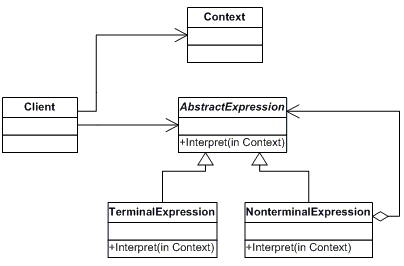
Interpreter
A way to include language elements in a program.
Given a language, define a representation for its grammar along with an interpreter that uses the representation to interpret sentences in the language.
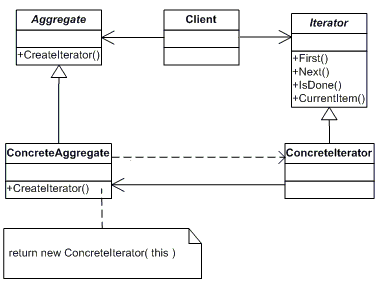
Iterator
Sequentially access the elements of a collection.
Provide a way to access the elements of an aggregate object sequentially without exposing its underlying representation.
Mediator
Defines simplified communication between classes.
Define an object that encapsulates how a set of objects interact. Mediator promotes loose coupling by keeping objects from referring to each other explicitly, and it lets you vary their interaction independently.

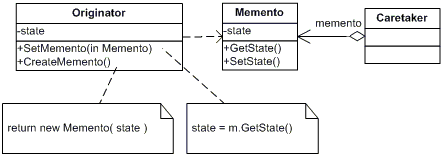
Memento
Capture and restore an object's internal state.
Without violating encapsulation, capture and externalize an object's internal state so that the object can be restored to this state later.
Observer
A way of notifying change to a number of classes.
 Define a one-to-many dependency between objects so that when one object changes state, all its dependents are notified and updated automatically.

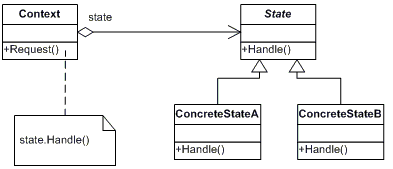
State
Alter an object's behavior when its state changes.
Allow an object to alter its behavior when its internal state changes. The object will appear to change its class.
Strategy
Encapsulates an algorithm inside a class.
Define a family of algorithms, encapsulate each one, and make them interchangeable. Strategy lets the algorithm vary independently from clients that use it.

TemplateMethod
Defer the exact steps of an algorithm to a subclass.
Define the skeleton of an algorithm in an operation, deferring some steps to subclasses. Template Method lets subclasses redefine certain steps of an algorithm without changing the algorithm's structure.

Visitor
Defines a new operation to a class without change.
Represent an operation to be performed on the elements of an object structure. Visitor lets you define a new operation without changing the classes of the elements on which it operates.

Creates an instance of several families of classes.
Provide an interface for creating families of related or dependent objects without specifying their concrete classes.
Builder
Separates object construction from its representation.
Separate the construction of a complex object from its representation so that the same construction process can create different representation.
FactoryMethod
Creates an instance of several derived classes.
Define an interface for creating an object, but let subclasses decide which class to instantiate. Factory Method lets a class defer instantiation to subclasses.
Prototype
A fully initialized instance to be copied or cloned.
Specify the kind of objects to create using a prototypical instance, and create new objects by copying this prototype.
Singleton
A class of which only a single instance can exist.
Ensure a class has only one instance and provide a global point of access to it.

Adapter
Match interfaces of different classes.
Convert the interface of a class into another interface clients expect. Adapter lets classes work together that couldn't otherwise because of incompatible interfaces.
Bridge
Separates an object’s interface from its implementation.
Decouple an abstraction from its implementation so that the two can vary independently.
Composite
A tree structure of simple and composite object.
Compose objects into tree structures to represent part-whole hierarchies. Composite lets clients treat individual objects and compositions of objects uniformly.
Decorator
Add responsibilities to objects dynamically.
Attach additional responsibilities to an object dynamically. Decorators provide a flexible alternative to subclassing for extending functionality.
Facade
A single class that represents an entire subsystem.
Provide a unified interface to a set of interfaces in a subsystem. Façade defines a higher-level interface that makes the subsystem easier to use.

Flyweight
A fine-grained instance used for efficient sharing.
Use sharing to support large numbers of fine-grained objects efficiently.
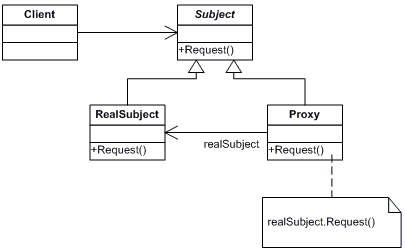
Proxy
An object representing another object.
Provide a surrogate or placeholder for another object to control access to it.
ChainResp
A way of passing a request between a chain of objects.
Avoid coupling the sender of a request to its receiver by giving more than one object a chance to handle the request. Chain the receiving objects and pass the request along the chain until an object handles it.
Command
Encapsulate a command request as an object.
Encapsulate a request as an object, thereby letting you parameterize clients with different requests, queue or log requests, and support undoable operations.
Interpreter
A way to include language elements in a program.
Given a language, define a representation for its grammar along with an interpreter that uses the representation to interpret sentences in the language.
Iterator
Sequentially access the elements of a collection.
Provide a way to access the elements of an aggregate object sequentially without exposing its underlying representation.
Mediator
Defines simplified communication between classes.
Define an object that encapsulates how a set of objects interact. Mediator promotes loose coupling by keeping objects from referring to each other explicitly, and it lets you vary their interaction independently.
Memento
Capture and restore an object's internal state.
Without violating encapsulation, capture and externalize an object's internal state so that the object can be restored to this state later.
Observer
A way of notifying change to a number of classes.
Define a one-to-many dependency between objects so that when one object changes state, all its dependents are notified and updated automatically.State
Alter an object's behavior when its state changes.
Allow an object to alter its behavior when its internal state changes. The object will appear to change its class.
Strategy
Encapsulates an algorithm inside a class.
Define a family of algorithms, encapsulate each one, and make them interchangeable. Strategy lets the algorithm vary independently from clients that use it.
TemplateMethod
Defer the exact steps of an algorithm to a subclass.
Define the skeleton of an algorithm in an operation, deferring some steps to subclasses. Template Method lets subclasses redefine certain steps of an algorithm without changing the algorithm's structure.
Visitor
Defines a new operation to a class without change.
Represent an operation to be performed on the elements of an object structure. Visitor lets you define a new operation without changing the classes of the elements on which it operates.
About Makefile C Flags
Optimizing Your Makefile C Flags for different OS
There is a different setup for differents OS:
# Linux defaults:
prefix = /usr
CC=gcc
#CFLAGS=-ggdb -Wall -DLINUX -D_LARGEFILE64_SOURCE -D_FILE_OFFSET_BITS=64
CFLAGS=-O2 -Wall -fomit-frame-pointer -DLINUX -D_LARGEFILE64_SOURCE -D_FILE_OFFSET_BITS=64
LDFLAGS=-s
TREE_DEST=tree
MANDIR=${prefix}/man/man1
VERSION=1.5.2.2
BINDIR=${prefix}/bin
MAN=tree.1
# Uncomment for FreeBSD:
prefix = /usr
CC=gcc
CFLAGS=-O2 -Wall -fomit-frame-pointer
LDFLAGS=-s
TREE_DEST=tree
XOBJS=strverscmp.o
MANDIR=${prefix}/man/man1
VERSION=1.5.2.2
BINDIR=${prefix}/bin
MAN=tree.1
# Uncomment for Solaris:
prefix = /usr
CC=cc
CFLAGS=-xO0 -v
LDFLAGS=
TREE_DEST=tree
XOBJS=strverscmp.o
MANDIR=${prefix}/share/man/man1
VERSION=1.5.2.2
BINDIR=${prefix}/bin
MAN=tree.1
# Uncomment for Cygwin:
prefix = /usr
CC=gcc
CFLAGS=-O2 -Wall -fomit-frame-pointer -DCYGWIN
LDFLAGS=-s
TREE_DEST=tree.exe
XOBJS=strverscmp.o
MANDIR=${prefix}/man/man1
VERSION=1.5.2.2
BINDIR=${prefix}/bin
MAN=tree.1
# Uncomment for OS X:
prefix = /usr
CC=cc
CFLAGS=-O2 -Wall -fomit-frame-pointer -no-cpp-precomp
LDFLAGS=
TREE_DEST=tree
XOBJS=strverscmp.o
MANDIR=${prefix}/man/man1
VERSION=1.5.2.2
BINDIR=${prefix}/bin
MAN=tree.1
# Uncomment for HP/UX:
prefix = /usr
CC=cc
CFLAGS=-Ae +O2 +DAportable -Wall
LDFLAGS=
TREE_DEST=tree
XOBJS=strverscmp.o
MANDIR=${prefix}/man/man1
VERSION=1.5.2.2
BINDIR=${prefix}/bin
MAN=tree.1
# Uncomment for OS/2:
prefix = /usr
CC=gcc
CFLAGS=-02 -Wall -fomit-frame-pointer -Zomf -Zsmall-conv
LDFLAGS=-s -Zomf -Zsmall-conv
TREE_DEST=tree
XOBJS=strverscmp.o
MANDIR=${prefix}/man/man1
VERSION=1.5.2.2
BINDIR=${prefix}/bin
MAN=tree.1
# Uncomment for HP NonStop:
prefix = /opt
CC=c89
CFLAGS=-Wextensions -WIEEE_float -g -Wnowarn=1506 -D_XOPEN_SOURCE_EXTENDED=1 -Wallow_cplusplus_comments
LDFLAGS=
TREE_DEST=tree
MANDIR=${prefix}/man/man1
VERSION=1.5.2.2
BINDIR=${prefix}/bin
MAN=tree.1
There is a different setup for differents OS:
# Linux defaults:
prefix = /usr
CC=gcc
#CFLAGS=-ggdb -Wall -DLINUX -D_LARGEFILE64_SOURCE -D_FILE_OFFSET_BITS=64
CFLAGS=-O2 -Wall -fomit-frame-pointer -DLINUX -D_LARGEFILE64_SOURCE -D_FILE_OFFSET_BITS=64
LDFLAGS=-s
TREE_DEST=tree
MANDIR=${prefix}/man/man1
VERSION=1.5.2.2
BINDIR=${prefix}/bin
MAN=tree.1
# Uncomment for FreeBSD:
prefix = /usr
CC=gcc
CFLAGS=-O2 -Wall -fomit-frame-pointer
LDFLAGS=-s
TREE_DEST=tree
XOBJS=strverscmp.o
MANDIR=${prefix}/man/man1
VERSION=1.5.2.2
BINDIR=${prefix}/bin
MAN=tree.1
# Uncomment for Solaris:
prefix = /usr
CC=cc
CFLAGS=-xO0 -v
LDFLAGS=
TREE_DEST=tree
XOBJS=strverscmp.o
MANDIR=${prefix}/share/man/man1
VERSION=1.5.2.2
BINDIR=${prefix}/bin
MAN=tree.1
# Uncomment for Cygwin:
prefix = /usr
CC=gcc
CFLAGS=-O2 -Wall -fomit-frame-pointer -DCYGWIN
LDFLAGS=-s
TREE_DEST=tree.exe
XOBJS=strverscmp.o
MANDIR=${prefix}/man/man1
VERSION=1.5.2.2
BINDIR=${prefix}/bin
MAN=tree.1
# Uncomment for OS X:
prefix = /usr
CC=cc
CFLAGS=-O2 -Wall -fomit-frame-pointer -no-cpp-precomp
LDFLAGS=
TREE_DEST=tree
XOBJS=strverscmp.o
MANDIR=${prefix}/man/man1
VERSION=1.5.2.2
BINDIR=${prefix}/bin
MAN=tree.1
# Uncomment for HP/UX:
prefix = /usr
CC=cc
CFLAGS=-Ae +O2 +DAportable -Wall
LDFLAGS=
TREE_DEST=tree
XOBJS=strverscmp.o
MANDIR=${prefix}/man/man1
VERSION=1.5.2.2
BINDIR=${prefix}/bin
MAN=tree.1
# Uncomment for OS/2:
prefix = /usr
CC=gcc
CFLAGS=-02 -Wall -fomit-frame-pointer -Zomf -Zsmall-conv
LDFLAGS=-s -Zomf -Zsmall-conv
TREE_DEST=tree
XOBJS=strverscmp.o
MANDIR=${prefix}/man/man1
VERSION=1.5.2.2
BINDIR=${prefix}/bin
MAN=tree.1
# Uncomment for HP NonStop:
prefix = /opt
CC=c89
CFLAGS=-Wextensions -WIEEE_float -g -Wnowarn=1506 -D_XOPEN_SOURCE_EXTENDED=1 -Wallow_cplusplus_comments
LDFLAGS=
TREE_DEST=tree
MANDIR=${prefix}/man/man1
VERSION=1.5.2.2
BINDIR=${prefix}/bin
MAN=tree.1
Subscribe to:
Posts (Atom)